<?xml version="1.0" encoding="UTF-8"?>
<?xml-stylesheet href="/vendor/feed/atom.xsl" type="text/xsl"?>
<feed xmlns="http://www.w3.org/2005/Atom" xml:lang="en-US">
                        <id>https://there-there.app/blog/feed</id>
                                <link href="https://there-there.app/blog/feed" rel="self"></link>
                                <title><![CDATA[There There Blog]]></title>
                    
                                <subtitle>Product updates, engineering notes, and thoughts on support from the team building There There.</subtitle>
                                                    <updated>2026-06-18T00:00:00+00:00</updated>
                        <entry>
            <title><![CDATA[Designing the waiting until feature]]></title>
            <link rel="alternate" href="https://there-there.app/blog/designing-the-waiting-until-feature" />
            <id>https://there-there.app/blog/designing-the-waiting-until-feature</id>
            <author>
                <name><![CDATA[Freek]]></name>
            </author>
            <summary type="html">
                <![CDATA[<p>A little while ago, one of our users asked for snoozing: set a handled ticket aside and have it come back to the top of the inbox automatically at a time they pick. You reach for that constantly in support, whether you're checking back on a fix in a few days or following up on a sales question next week.</p>
<p>We liked it, so we built it. The feature is small, but the way you pick that time went through a few versions before it felt right, and that's the part worth sharing.</p>
<h2>We started with a list of presets</h2>
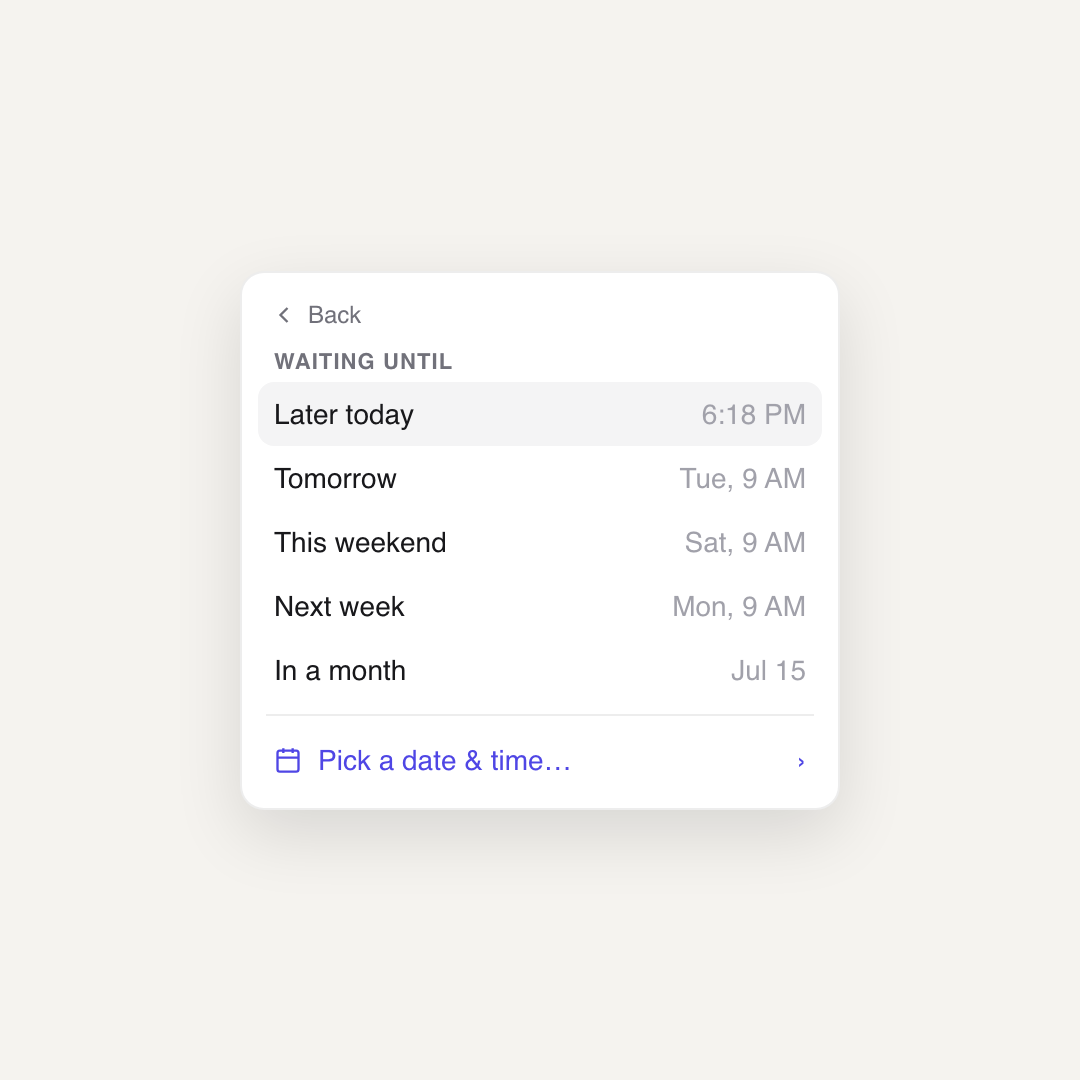
<p>The first version was the obvious one. A small menu with a handful of choices: later today, tomorrow, this weekend, next week, in a month. Anything else dropped you into a calendar.</p>
<p><img src="https://content.spatie.be/assets/01-hardcoded-presets.png" alt="A dropdown listing preset waiting times: later today, tomorrow, this weekend, next week and in a month" /></p>
<p>Plenty of tools ship exactly this, and it works. But using presets only cover the cases you thought of. The moment someone wants &quot;next tuesday afternoon&quot; or &quot;the 23rd at noon&quot;, they fall through to the calendar, and now there are two completely different ways to pick a time in the same little menu.</p>
<h2>Then we let you just type it</h2>
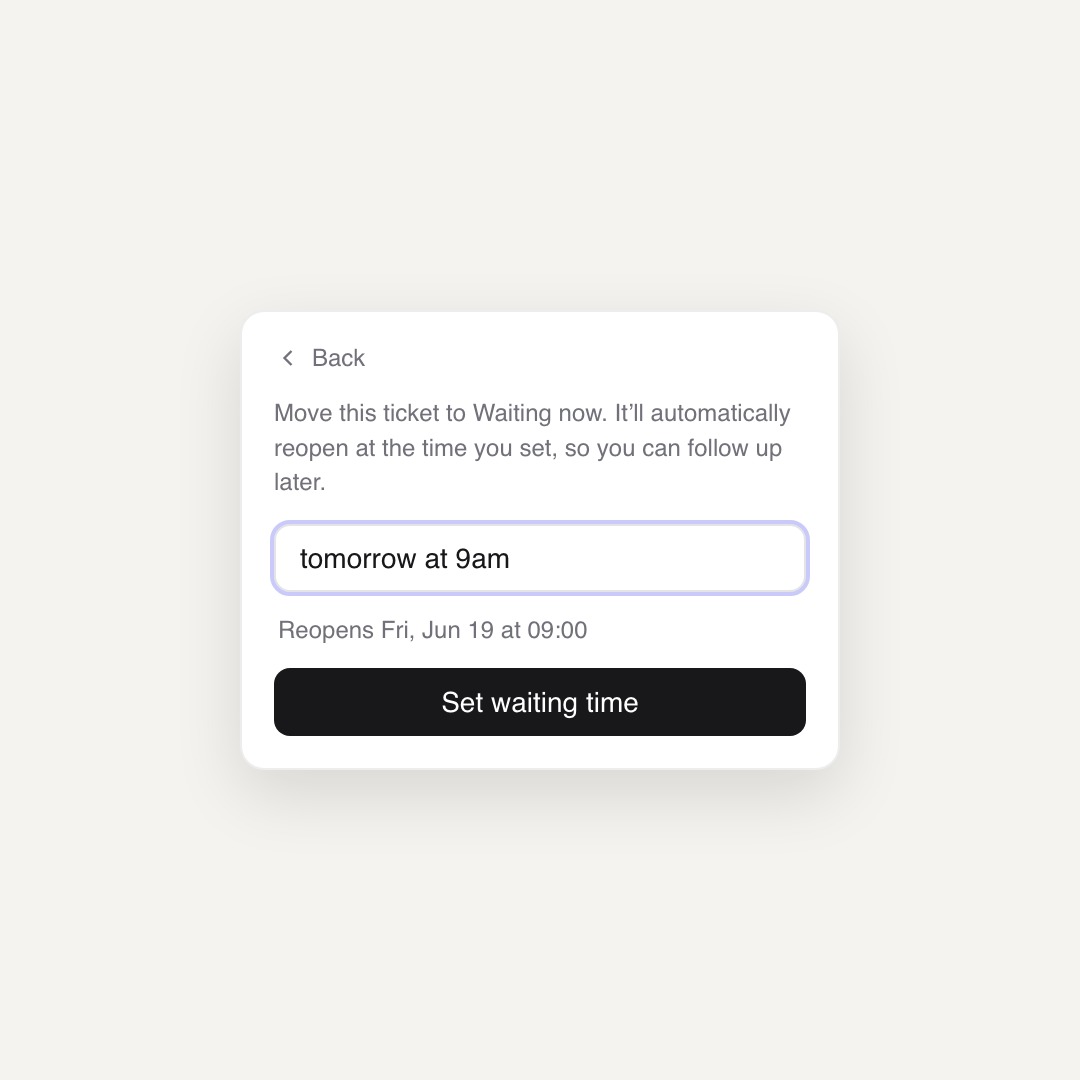
<p>So we threw the hard coded list away and replaced it with a single text field. You write when you want the ticket back in plain language, &quot;tomorrow at 9am&quot; or &quot;in 3 hours&quot;, and that's it.</p>
<p><img src="https://content.spatie.be/assets/02-natural-language-field.png" alt="A text field reading &quot;tomorrow at 9am&quot; with a preview underneath reading &quot;Reopens Fri, Jun 19 at 09:00&quot;" /></p>
<p>Parsing human dates yourself is a swamp you don't want to wade into. There's a library that already does it well, <a href="https://github.com/wanasit/chrono">chrono-node</a>, and it carries the whole feature. Here's the core of how we use it:</p>
<pre class="shiki" style="background-color: #fff"><code><span class="line"><span style="color:#D73A49">import</span><span style="color:#24292E"> </span><span style="color:#005CC5">*</span><span style="color:#24292E"> </span><span style="color:#D73A49">as</span><span style="color:#24292E"> chrono </span><span style="color:#D73A49">from</span><span style="color:#24292E"> </span><span style="color:#032F62">&#39;chrono-node&#39;</span><span style="color:#24292E">;</span></span>
<span class="line"></span>
<span class="line"><span style="color:#D73A49">function</span><span style="color:#24292E"> </span><span style="color:#6F42C1">parseWhen</span><span style="color:#24292E">(</span><span style="color:#E36209">text</span><span style="color:#D73A49">:</span><span style="color:#24292E"> </span><span style="color:#005CC5">string</span><span style="color:#24292E">)</span><span style="color:#D73A49">:</span><span style="color:#24292E"> </span><span style="color:#6F42C1">Date</span><span style="color:#24292E"> </span><span style="color:#D73A49">|</span><span style="color:#24292E"> </span><span style="color:#005CC5">null</span><span style="color:#24292E"> {</span></span>
<span class="line"><span style="color:#24292E">    </span><span style="color:#D73A49">if</span><span style="color:#24292E"> (text.trim() === &#39;&#39;) {</span></span>
<span class="line"><span style="color:#24292E">        </span><span style="color:#6F42C1">return</span><span style="color:#24292E"> </span><span style="color:#005CC5">null</span><span style="color:#24292E">;</span></span>
<span class="line"><span style="color:#24292E">    }</span></span>
<span class="line"></span>
<span class="line"><span style="color:#24292E">    </span><span style="color:#6F42C1">return</span><span style="color:#24292E"> chrono.</span><span style="color:#6F42C1">parseDate</span><span style="color:#24292E">(text, </span><span style="color:#D73A49">new</span><span style="color:#24292E"> </span><span style="color:#6F42C1">Date</span><span style="color:#24292E">(), { forwardDate: </span><span style="color:#005CC5">true });</span></span>
<span class="line"><span style="color:#24292E">}</span></span>
<span class="line"></span></code></pre>
<p>That's the entire parser. <code>parseDate</code> returns a <code>Date</code> or <code>null</code>, so a failed parse is trivial to handle. The <code>forwardDate</code> option is the detail that makes it feel right: when the input is ambiguous, chrono resolves it into the future. Type &quot;9am&quot; after nine in the morning and you get tomorrow at nine, not a time that already passed today. For a snooze, the future is almost always what you mean.</p>
<p>The risk with free text is that people don't trust it. They type something and wonder what the computer actually understood. So under the field we show the parsed result back, &quot;Reopens Fri, Jun 19 at 09:00&quot;, and we update it as you type. We debounce that preview so it settles after you pause instead of flickering on every keystroke, and we only show a validation error once you actually try to submit, never while you're still typing.</p>
<h2>Recents bring back the one-click speed</h2>
<p>Typing is flexible, but we gave up something when we deleted the presets: the single tap. Clicking &quot;tomorrow&quot; was faster than typing it. We wanted that speed back without bringing the hardcoded list back.</p>
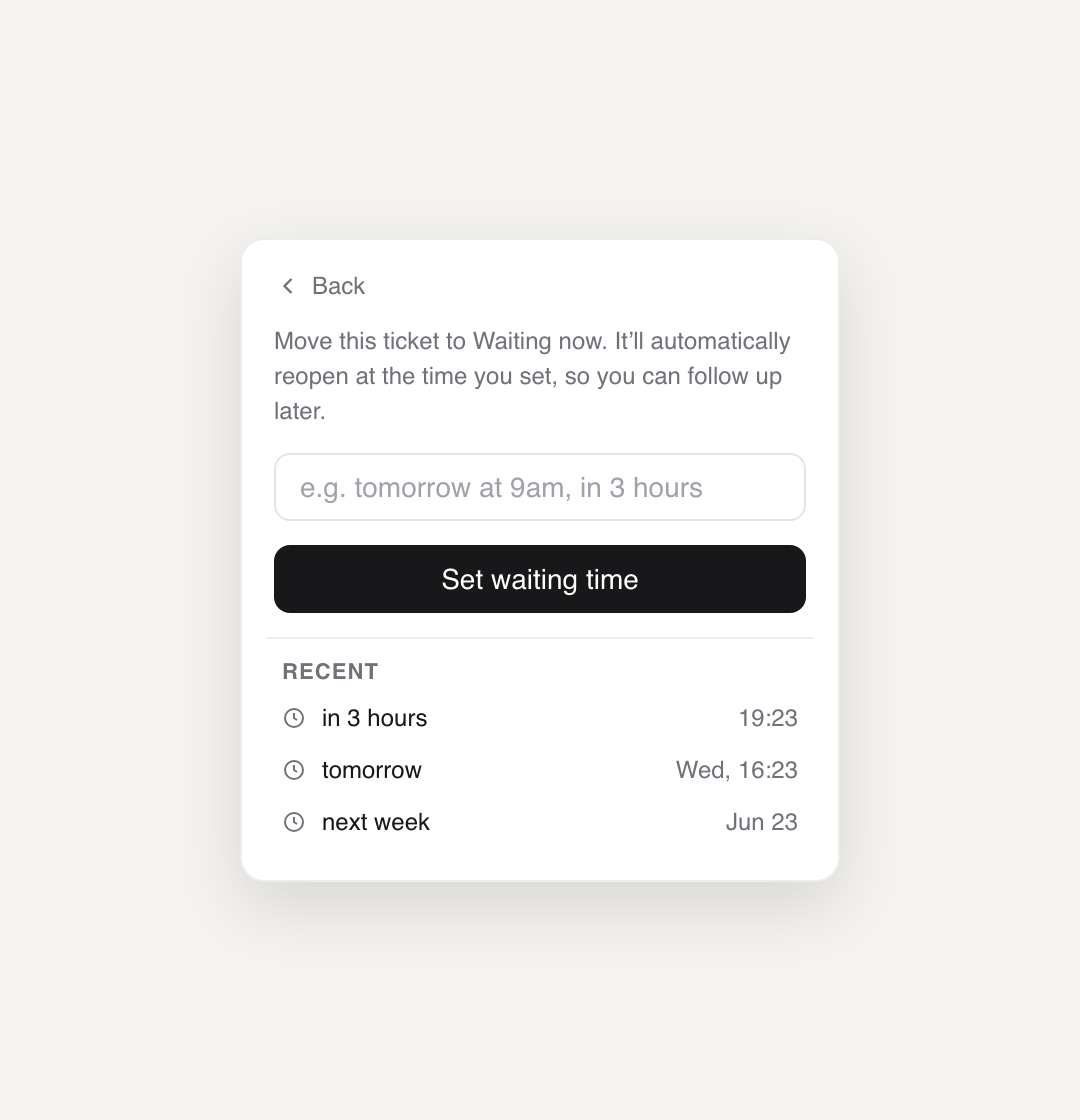
<p>The answer was to remember what you type. Every phrase you confirm gets saved, and the next time you open the field they're waiting there as one-click options.</p>
<p><img src="https://content.spatie.be/assets/03-recents.png" alt="The field with a recent list underneath showing in 3 hours, tomorrow and next week with their resolved times" /></p>
<p>A few decisions went into that list. We keep three, deduplicated, so it stays short and doesn't fill up with near-identical entries. We sort them by their resolved time, soonest at the top, rather than by how recently you typed them, because when you're scanning for &quot;the soon one&quot; versus &quot;the far one&quot; the time is what you're after. And we store the phrase you typed, not the date it resolved to, then re-parse it on click. That way &quot;in 3 hours&quot; still means three hours from now the next time you use it, instead of pointing at a moment that's long gone.</p>
<p>The nice part is that the list becomes yours. If you always snooze things to &quot;monday 9am&quot;, that's what sits at the top, not a generic option we picked for everyone.</p>
<h2>It's live, and it came from you</h2>
<p>Waiting until is available now for every There There workspace. Open a ticket, set it to Waiting, and type when you want it back.</p>
<p>If you're using There There and there's something you wish it did, tell us. There's a decent chance you'll see it in a post like this one.</p>
]]>
            </summary>
                                    <updated>2026-06-18T00:00:00+00:00</updated>
        </entry>
            <entry>
            <title><![CDATA[A sidebar that gets out of the way]]></title>
            <link rel="alternate" href="https://there-there.app/blog/sweating-the-details-of-our-sidebar" />
            <id>https://there-there.app/blog/sweating-the-details-of-our-sidebar</id>
            <author>
                <name><![CDATA[Freek]]></name>
            </author>
            <summary type="html">
                <![CDATA[<p>When using There There, you'll probably spend the most time on the tickets pages. On the left side of that screen there is a sidebar that allow you to navigate to all ticket views.</p>
<p>In There There, all panes are resizeable so you can size a ticket message, the AI panel, ... to how you like best. The sidebar can of course also be dragged. And to make it get out of your way, we added a collapsed state of it as well.</p>
<p>We have spent some time animating going from/to the different states. You can click the border of the sidebar to see that animation. You can also manual drag so you can see the animation slowly.</p>
<video autoplay loop muted playsinline style="display: block; width: 100%; max-width: 420px; height: auto; margin: 2rem auto; border-radius: 8px;">
  <source src="https://content.spatie.be/assets/there-there-sidebar-collapse.mp4" type="video/mp4">
</video>
<p>Pretty slick, right?</p>
<p>Small thing, but it is the kind of detail we like to sweat.</p>
]]>
            </summary>
                                    <updated>2026-06-08T00:00:00+00:00</updated>
        </entry>
            <entry>
            <title><![CDATA[A "Thank You" shouldn't reopen a ticket]]></title>
            <link rel="alternate" href="https://there-there.app/blog/a-thank-you-shouldnt-reopen-a-ticket" />
            <id>https://there-there.app/blog/a-thank-you-shouldnt-reopen-a-ticket</id>
            <author>
                <name><![CDATA[Freek]]></name>
            </author>
            <summary type="html">
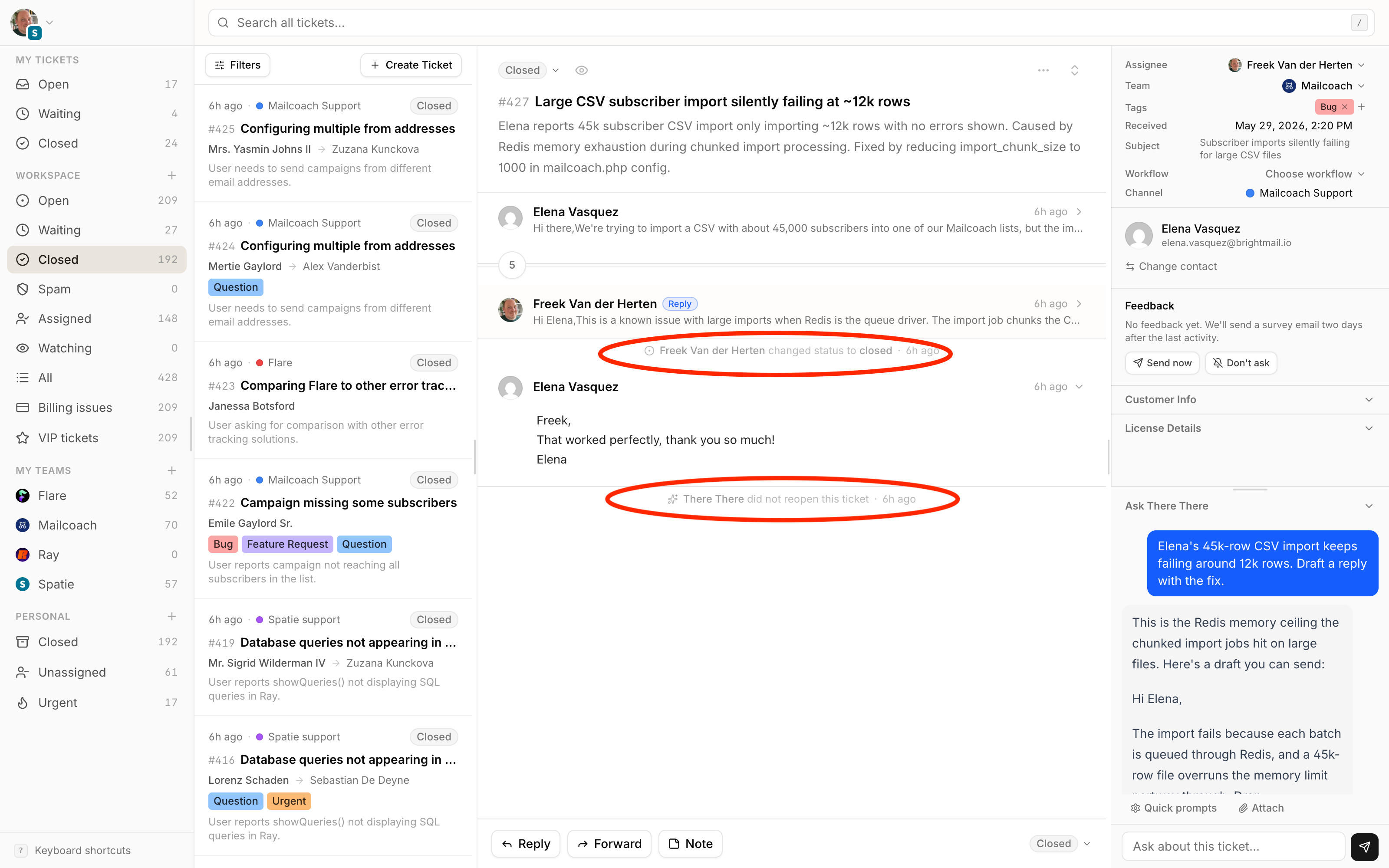
                <![CDATA[<p>You <a href="https://there-there.app/docs/tickets/managing-tickets">close a ticket</a>. The customer had a real problem, you solved it, and you've reached support inbox zero. Bliss! But one minute later, the ticket is back open, because the customer responded with: &quot;Thanks, that did it.&quot;</p>
<p>While it's always nice to get a thank you as a response, it's slightly annoying that in most helpdesks such a response reopens the ticket. And you have to close it manually again.</p>
<p>It's a tiny moment, but it repeats all day, on every closed ticket a customer is kind enough to acknowledge. A thank-you shouldn't cost you a context switch.</p>
<p>So There There leaves a closed ticket closed when the reply is only a thank-you. Getting that right took more care than you'd think, so here's how it works.</p>
<p><img src="https://content.spatie.be/assets/there-there-ui-retina.png" alt="" /></p>
<h2>The rule we wanted</h2>
<p>We keep a ticket closed only when the reply has nothing to act on. A question, a follow-up, a link, a complaint, anything that needs a reply, and it reopens like normal.</p>
<p>One kind of mistake is much worse than the other. If we wrongly keep a ticket closed, a real customer message slips through unnoticed. If we wrongly reopen one, you just close it again. So whenever we're unsure, we reopen.</p>
<h2>A cheap check before an expensive one</h2>
<p>To avoid AI costs, we first try to detect with plain code when a reply isn't a regular thank-you. The obvious cases are cheap to rule out:</p>
<pre class="shiki" style="background-color: #fff"><code><span class="line"><span style="color:#D73A49">private</span><span style="color:#24292E"> </span><span style="color:#D73A49">function</span><span style="color:#24292E"> </span><span style="color:#6F42C1">mightBeThanksOnly</span><span style="color:#24292E">(string $messageText): bool</span></span>
<span class="line"><span style="color:#24292E">{</span></span>
<span class="line"><span style="color:#24292E">    $maxThanksOnlyLength </span><span style="color:#D73A49">=</span><span style="color:#24292E"> </span><span style="color:#005CC5">500</span><span style="color:#24292E">;</span></span>
<span class="line"></span>
<span class="line"><span style="color:#24292E">    </span><span style="color:#6A737D">// A genuine thank-you is short; anything long probably has substance.</span></span>
<span class="line"><span style="color:#24292E">    if (mb_strlen($messageText) &gt; $maxThanksOnlyLength) {</span></span>
<span class="line"><span style="color:#24292E">        </span><span style="color:#D73A49">return</span><span style="color:#24292E"> </span><span style="color:#005CC5">false</span><span style="color:#24292E">;</span></span>
<span class="line"><span style="color:#24292E">    }</span></span>
<span class="line"></span>
<span class="line"><span style="color:#24292E">    </span><span style="color:#6A737D">// A question mark means the customer is asking something.</span></span>
<span class="line"><span style="color:#24292E">    </span><span style="color:#D73A49">if</span><span style="color:#24292E"> (</span><span style="color:#6F42C1">str_contains</span><span style="color:#24292E">($messageText, &#39;?&#39;)) {</span></span>
<span class="line"><span style="color:#24292E">        </span><span style="color:#D73A49">return</span><span style="color:#24292E"> </span><span style="color:#005CC5">false</span><span style="color:#24292E">;</span></span>
<span class="line"><span style="color:#24292E">    }</span></span>
<span class="line"></span>
<span class="line"><span style="color:#24292E">    </span><span style="color:#6A737D">// A link means &quot;take a look at this&quot;, so there&#39;s something to do.</span></span>
<span class="line"><span style="color:#24292E">    </span><span style="color:#D73A49">if</span><span style="color:#24292E"> (</span><span style="color:#005CC5">preg_match</span><span style="color:#24292E">(</span><span style="color:#032F62">&#39;#https?://#i&#39;</span><span style="color:#24292E">, $messageText) </span><span style="color:#D73A49">===</span><span style="color:#24292E"> </span><span style="color:#005CC5">1</span><span style="color:#24292E">) {</span></span>
<span class="line"><span style="color:#24292E">        </span><span style="color:#D73A49">return</span><span style="color:#24292E"> </span><span style="color:#005CC5">false</span><span style="color:#24292E">;</span></span>
<span class="line"><span style="color:#24292E">    }</span></span>
<span class="line"></span>
<span class="line"><span style="color:#24292E">    </span><span style="color:#D73A49">return</span><span style="color:#24292E"> </span><span style="color:#005CC5">true</span><span style="color:#24292E">;</span></span>
<span class="line"><span style="color:#24292E">}</span></span>
<span class="line"></span></code></pre>
<p>Anything that doesn't pass reopens the ticket without a model ever running, which handles most replies on its own.</p>
<h2>A tiny agent with one job</h2>
<p>Only the survivors reach a model, and it's the cheapest one we have, doing the smallest task there is: return a single boolean.</p>
<pre class="shiki" style="background-color: #fff"><code><span class="line"><span style="color:#D73A49">class</span><span style="color:#24292E"> </span><span style="color:#6F42C1">DetectThanksOnlyMessageAgent implements Agent, HasMiddleware, HasStructuredOutput</span></span>
<span class="line"><span style="color:#24292E">{</span></span>
<span class="line"><span style="color:#24292E">    </span><span style="color:#D73A49">use</span><span style="color:#24292E"> </span><span style="color:#005CC5">Promptable</span><span style="color:#24292E">;</span></span>
<span class="line"></span>
<span class="line"><span style="color:#24292E">    </span><span style="color:#D73A49">public</span><span style="color:#24292E"> </span><span style="color:#D73A49">function</span><span style="color:#24292E"> </span><span style="color:#6F42C1">model</span><span style="color:#24292E">()</span><span style="color:#D73A49">:</span><span style="color:#24292E"> </span><span style="color:#D73A49">string</span></span>
<span class="line"><span style="color:#24292E">    {</span></span>
<span class="line"><span style="color:#24292E">        </span><span style="color:#D73A49">return</span><span style="color:#24292E"> </span><span style="color:#6F42C1">config</span><span style="color:#24292E">(&#39;ai-pricing.cheap.name&#39;);</span></span>
<span class="line"><span style="color:#24292E">    }</span></span>
<span class="line"></span>
<span class="line"><span style="color:#24292E">    </span><span style="color:#D73A49">public</span><span style="color:#24292E"> </span><span style="color:#D73A49">function</span><span style="color:#24292E"> </span><span style="color:#6F42C1">instructions</span><span style="color:#24292E">()</span><span style="color:#D73A49">:</span><span style="color:#24292E"> </span><span style="color:#005CC5">Stringable</span><span style="color:#24292E">|</span><span style="color:#D73A49">string</span></span>
<span class="line"><span style="color:#24292E">    {</span></span>
<span class="line"><span style="color:#24292E">        </span><span style="color:#D73A49">return</span><span style="color:#24292E"> </span><span style="color:#6F42C1">view</span><span style="color:#24292E">(</span><span style="color:#032F62">&#39;prompts.ai.detect-thanks-only-message&#39;</span><span style="color:#24292E">)</span><span style="color:#D73A49">-&gt;</span><span style="color:#6F42C1">render</span><span style="color:#24292E">();</span></span>
<span class="line"><span style="color:#24292E">    }</span></span>
<span class="line"></span>
<span class="line"><span style="color:#24292E">    </span><span style="color:#D73A49">public</span><span style="color:#24292E"> </span><span style="color:#D73A49">function</span><span style="color:#24292E"> </span><span style="color:#6F42C1">schema</span><span style="color:#24292E">(</span><span style="color:#005CC5">JsonSchema</span><span style="color:#24292E"> $schema)</span><span style="color:#D73A49">:</span><span style="color:#24292E"> </span><span style="color:#D73A49">array</span></span>
<span class="line"><span style="color:#24292E">    {</span></span>
<span class="line"><span style="color:#24292E">        </span><span style="color:#D73A49">return</span><span style="color:#24292E"> [</span></span>
<span class="line"><span style="color:#24292E">            </span><span style="color:#032F62">&#39;is_thanks_only&#39;</span><span style="color:#24292E"> </span><span style="color:#D73A49">=&gt;</span><span style="color:#24292E"> $schema</span><span style="color:#D73A49">-&gt;</span><span style="color:#6F42C1">boolean</span><span style="color:#24292E">()</span><span style="color:#D73A49">-&gt;</span><span style="color:#6F42C1">required</span><span style="color:#24292E">(),</span></span>
<span class="line"><span style="color:#24292E">        ];</span></span>
<span class="line"><span style="color:#24292E">    }</span></span>
<span class="line"><span style="color:#24292E">}</span></span>
<span class="line"></span></code></pre>
<p>We ask for <code>is_thanks_only</code>, true or false, and Laravel's <a href="https://github.com/laravel/ai">AI SDK</a> hands back a validated shape, no parsing required. The prompt handles the nuance: it ignores quoted text, signatures, and &quot;Sent from my iPhone&quot; footers, counts &quot;bedankt&quot;, &quot;merci&quot;, and &quot;danke&quot; as thanks, and when in doubt classifies as not thanks-only.</p>
<h2>Fail toward the safe behaviour</h2>
<p>A model can be slow, rate-limited, or simply down. So the whole check fails in the safe direction.</p>
<pre class="shiki" style="background-color: #fff"><code><span class="line"><span style="color:#D73A49">try {</span></span>
<span class="line"><span style="color:#24292E">    $response </span><span style="color:#D73A49">=</span><span style="color:#24292E"> (</span><span style="color:#D73A49">new</span><span style="color:#24292E"> DetectThanksOnlyMessageAgent($ticket-&gt;workspace))</span></span>
<span class="line"><span style="color:#24292E">        </span><span style="color:#D73A49">-&gt;</span><span style="color:#6F42C1">prompt</span><span style="color:#24292E">($messageText);</span></span>
<span class="line"><span style="color:#24292E">} </span><span style="color:#D73A49">catch</span><span style="color:#24292E"> (</span><span style="color:#005CC5">Throwable</span><span style="color:#24292E"> $exception) {</span></span>
<span class="line"><span style="color:#24292E">    </span><span style="color:#005CC5">Log</span><span style="color:#D73A49">::</span><span style="color:#6F42C1">warning</span><span style="color:#24292E">(</span><span style="color:#032F62">&#39;Thanks-only detection failed; reopening ticket as usual&#39;</span><span style="color:#24292E">, [</span></span>
<span class="line"><span style="color:#24292E">        </span><span style="color:#032F62">&#39;ticket_id&#39;</span><span style="color:#24292E"> </span><span style="color:#D73A49">=&gt;</span><span style="color:#24292E"> $ticket</span><span style="color:#D73A49">-&gt;</span><span style="color:#24292E">id,</span></span>
<span class="line"><span style="color:#24292E">        </span><span style="color:#032F62">&#39;message_id&#39;</span><span style="color:#24292E"> </span><span style="color:#D73A49">=&gt;</span><span style="color:#24292E"> $message</span><span style="color:#D73A49">-&gt;</span><span style="color:#24292E">id,</span></span>
<span class="line"><span style="color:#24292E">        </span><span style="color:#032F62">&#39;error&#39;</span><span style="color:#24292E"> </span><span style="color:#D73A49">=&gt;</span><span style="color:#24292E"> $exception</span><span style="color:#D73A49">-&gt;</span><span style="color:#6F42C1">getMessage</span><span style="color:#24292E">(),</span></span>
<span class="line"><span style="color:#24292E">    ]);</span></span>
<span class="line"></span>
<span class="line"><span style="color:#24292E">    </span><span style="color:#D73A49">return</span><span style="color:#24292E"> </span><span style="color:#005CC5">false</span><span style="color:#24292E">;</span></span>
<span class="line"><span style="color:#24292E">}</span></span>
<span class="line"></span>
<span class="line"><span style="color:#D73A49">return</span><span style="color:#24292E"> (</span><span style="color:#D73A49">bool</span><span style="color:#24292E">) ($response[</span><span style="color:#032F62">&#39;is_thanks_only&#39;</span><span style="color:#24292E">] </span><span style="color:#D73A49">??</span><span style="color:#24292E"> </span><span style="color:#005CC5">false</span><span style="color:#24292E">);</span></span>
<span class="line"></span></code></pre>
<p>The expensive part is allowed to fail. The cheap fallback, reopening the ticket like we always did, is always underneath it.</p>
<h2>Leave a trace</h2>
<p>We never keep a ticket closed silently. Instead we record it as an activity on the ticket, with its own sparkles icon in the timeline.</p>
<pre class="shiki" style="background-color: #fff"><code><span class="line"><span style="color:#D73A49">if ($allowSuppression &amp;&amp; $this-&gt;messageIsThanksOnly($ticket, $message, $textOverride)) {</span></span>
<span class="line"><span style="color:#24292E">    </span><span style="color:#6F42C1">app</span><span style="color:#24292E">(RecordTicketActivityAction::class)-&gt;execute(</span></span>
<span class="line"><span style="color:#24292E">        </span><span style="color:#6F42C1">ticket</span><span style="color:#24292E">: $ticket,</span></span>
<span class="line"><span style="color:#24292E">        </span><span style="color:#6F42C1">type</span><span style="color:#24292E">: </span><span style="color:#005CC5">ActivityType</span><span style="color:#D73A49">::</span><span style="color:#005CC5">ReopenSuppressed</span><span style="color:#24292E">,</span></span>
<span class="line"><span style="color:#24292E">        </span><span style="color:#6F42C1">properties</span><span style="color:#24292E">: [</span><span style="color:#032F62">&#39;message_ulid&#39;</span><span style="color:#24292E"> </span><span style="color:#D73A49">=&gt;</span><span style="color:#24292E"> $message</span><span style="color:#D73A49">-&gt;</span><span style="color:#24292E">ulid],</span></span>
<span class="line"><span style="color:#24292E">    );</span></span>
<span class="line"></span>
<span class="line"><span style="color:#24292E">    </span><span style="color:#D73A49">return</span><span style="color:#24292E"> </span><span style="color:#005CC5">true</span><span style="color:#24292E">;</span></span>
<span class="line"><span style="color:#24292E">}</span></span>
<span class="line"></span>
<span class="line"><span style="color:#6F42C1">app</span><span style="color:#24292E">(</span><span style="color:#005CC5">ChangeTicketStatusAction</span><span style="color:#D73A49">::class</span><span style="color:#24292E">)</span><span style="color:#D73A49">-&gt;</span><span style="color:#6F42C1">execute</span><span style="color:#24292E">($ticket, </span><span style="color:#005CC5">TicketStatus</span><span style="color:#D73A49">::</span><span style="color:#005CC5">Open</span><span style="color:#24292E">);</span></span>
<span class="line"></span></code></pre>
<p>So anyone scanning the ticket sees that a thank-you arrived and we chose to leave it closed. If we ever get it wrong, it's in the history instead of being a mystery.</p>
<h2>In closing</h2>
<p>This feature isn't rocket science. Nobody subscribes to a helpdesk for how it handles the word &quot;thanks.&quot; But small things like this add up. They decide whether a tool feels good all day or like a thousand paper cuts.</p>
<p>We notice paper cuts like this because we use There There ourselves, every day, to support <a href="https://mailcoach.app">Mailcoach</a>, <a href="https://flareapp.io">Flare</a>, and all other <a href="https://spatie.be">Spatie</a> products. When something is annoying, we feel it before you do, and we fix it. Reopen suppression is just one of dozens of small fixes like that.</p>
<p>That's why we think There There can be one of the best helpdesks around: it's shaped by the people who use it every day.</p>
]]>
            </summary>
                                    <updated>2026-05-30T00:00:00+00:00</updated>
        </entry>
            <entry>
            <title><![CDATA[The stack behind There There]]></title>
            <link rel="alternate" href="https://there-there.app/blog/the-stack-behind-there-there" />
            <id>https://there-there.app/blog/the-stack-behind-there-there</id>
            <author>
                <name><![CDATA[Freek]]></name>
            </author>
            <summary type="html">
                <![CDATA[<p>At Spatie, we like to build in the open. We've just invited the first people who applied into the <a href="https://there-there.app/register">There There beta</a>, so this feels like a good moment to share what it's made of and why we made the choices we did. The stack you pick shapes how fast you can move and how much of your time goes into the actual product instead of the plumbing.</p>
<p>There There is a <a href="https://laravel.com">Laravel</a> app. That surprises nobody who knows us. At <a href="https://spatie.be">Spatie</a> we've been building quality Laravel applications since the framework's early days, so it's the foundation we know best. The interesting parts are the choices around the edges, so let me walk through the whole thing.</p>
<h2>Laravel, on purpose</h2>
<p>We've shipped Laravel apps for over a decade. We know its sharp edges and its escape hatches, and that accumulated knowledge is worth more to us than the newest framework of the month. Boring, in the sense of predictable, is a feature here. It means we spend our days on support workflows and AI, not on reinventing queues and authentication.</p>
<p>The app runs on the latest <a href="https://www.php.net">PHP</a> and Laravel. Sign-in is handled by <a href="https://laravel.com/docs/fortify">Fortify</a>, with <a href="https://laravel.com/docs/socialite">Socialite</a> for logging in through Google and GitHub. API access uses <a href="https://laravel.com/docs/sanctum">Sanctum</a> and <a href="https://laravel.com/docs/passport">Passport</a>, depending on the client.</p>
<h2>Inertia and React for the front end</h2>
<p>The interface is built with <a href="https://inertiajs.com">Inertia</a> and <a href="https://react.dev">React</a>, with <a href="https://www.typescriptlang.org">TypeScript</a> and <a href="https://tailwindcss.com">Tailwind</a> throughout. Inertia is the part I'd recommend to anyone building a Laravel app with a rich front end. You get the single-page feel without standing up and maintaining a separate API. The server stays the source of truth, and a controller hands a React page its props directly.</p>
<p>We use <a href="https://github.com/laravel/wayfinder">Wayfinder</a> to generate typed functions for our routes, so the front end calls backend endpoints without us copying URLs around by hand. When a route changes, TypeScript tells us what broke.</p>
<h2>A structure organised by domain</h2>
<p>Instead of letting <code>app/Models</code> and <code>app/Http</code> grow into a sprawl, we organise the code by domain. Each big concept in the app gets its own folder with everything it needs close by.</p>
<pre class="shiki" style="background-color: #fff"><code><span class="line"><span style="color:#005CC5">app</span><span style="color:#D73A49">/</span><span style="color:#005CC5">Domain</span><span style="color:#D73A49">/</span></span>
<span class="line"><span style="color:#24292E">  </span><span style="color:#005CC5">Tickets</span><span style="color:#D73A49">/</span></span>
<span class="line"><span style="color:#24292E">  </span><span style="color:#005CC5">Channels</span><span style="color:#D73A49">/</span></span>
<span class="line"><span style="color:#24292E">  </span><span style="color:#005CC5">Brain</span><span style="color:#D73A49">/</span></span>
<span class="line"><span style="color:#24292E">  </span><span style="color:#005CC5">Workspace</span><span style="color:#D73A49">/</span></span>
<span class="line"><span style="color:#24292E">  </span><span style="color:#005CC5">Ai</span><span style="color:#D73A49">/</span></span>
<span class="line"><span style="color:#24292E">  </span><span style="color:#005CC5">Workflow</span><span style="color:#D73A49">/</span></span>
<span class="line"></span></code></pre>
<p>Each domain holds its own models, actions, events, and the rest. Related code lives together, and it's obvious where a new feature belongs. If you want the full reasoning behind this approach, we cover it in depth in our <a href="https://laravel-beyond-crud.com">Laravel Beyond CRUD</a> course.</p>
<h2>The AI part</h2>
<p>The AI in There There runs on Laravel's <a href="https://github.com/laravel/ai">AI SDK</a>. When a ticket comes in, we gather context: the conversation so far, the customer's history, and the most relevant <a href="https://there-there.app/docs/ai/brains-your-ai-knowledge-base">knowledge base</a> articles. We find those articles with embeddings, so a search matches on meaning rather than on exact words. The model drafts a reply from that context, and it never sends anything to a customer on its own. A person always signs off.</p>
<h2>MCP, in both directions</h2>
<p>We lean on the <a href="https://modelcontextprotocol.io">Model Context Protocol</a> two ways. There There ships an <a href="https://github.com/laravel/mcp">MCP server</a>, so you can point an AI client at your workspace and have it read and manage tickets through a defined set of tools. Internally, <a href="https://there-there.app/docs/ai/mcp-connections">our own agents use those same tools</a> to do their work. The protocol gives the AI an explicit, safe list of actions instead of free rein over the database.</p>
<h2>The unglamorous plumbing</h2>
<p>A helpdesk lives and dies on boring infrastructure. Background work goes onto queues watched by <a href="https://laravel.com/docs/horizon">Horizon</a>. Live updates, like seeing a colleague pick up a ticket while you're looking at it, travel over websockets with <a href="https://laravel.com/docs/reverb">Reverb</a> and <a href="https://github.com/laravel/echo">Echo</a>. And we roll features out gradually with <a href="https://laravel.com/docs/pennant">Pennant</a>.</p>
<h2>Keeping ourselves honest</h2>
<p>Every change is covered by tests written with <a href="https://pestphp.com">Pest</a>, and we run <a href="https://github.com/larastan/larastan">Larastan</a> over the codebase to catch type problems before they ship. <a href="https://laravel.com/docs/pint">Pint</a> keeps the formatting consistent so nobody has to argue about it.</p>
<h2>Our own packages</h2>
<p>A fair amount of There There is held together by packages we wrote at Spatie and have leaned on for years. That isn't loyalty for its own sake. We reach for them because we already trust them in production.</p>
<p>Most of the data that moves between the backend and the React front end is shaped by <a href="https://github.com/spatie/laravel-data">laravel-data</a>, and <a href="https://github.com/spatie/laravel-typescript-transformer">laravel-typescript-transformer</a> turns those same objects into TypeScript types so the two sides can't drift apart. Ticket and channel queries are filtered and sorted with <a href="https://github.com/spatie/laravel-query-builder">laravel-query-builder</a>, and anything that needs a manual order uses <a href="https://github.com/spatie/eloquent-sortable">eloquent-sortable</a>.</p>
<p>Attachments on tickets and knowledge base articles are handled by <a href="https://github.com/spatie/laravel-medialibrary">laravel-medialibrary</a>. When someone wants a ticket thread as a document, we render it with <a href="https://github.com/spatie/laravel-pdf">laravel-pdf</a>, which drives a headless browser through <a href="https://github.com/spatie/browsershot">Browsershot</a>. The social share images you see when a page gets posted somewhere are generated on the fly by <a href="https://github.com/spatie/laravel-og-image">laravel-og-image</a>.</p>
<p>Filling the knowledge base means reaching out to the wider web, so we fetch pages with our <a href="https://github.com/spatie/crawler">crawler</a>, and we check records with <a href="https://github.com/spatie/dns">dns</a> when you connect an email channel. On the operations side, <a href="https://github.com/spatie/laravel-backup">laravel-backup</a> keeps the database safe, <a href="https://github.com/spatie/laravel-activitylog">activitylog</a> records who changed what, <a href="https://github.com/spatie/laravel-slack-alerts">laravel-slack-alerts</a> pings us when something noteworthy happens. There's more in the composer file, but you get the idea.</p>
<h2>Used services</h2>
<p>Beyond the code, a handful of hosted services keep There There running.</p>
<p><a href="https://flareapp.io">Flare</a> is where our errors, logs, and performance data go. When something throws in production, we get the exception with full context, and the performance side shows us which routes and queries are slowing down before anyone files a ticket about it. It's our own product, so we feel every rough edge firsthand.</p>
<p><a href="https://ohdear.app">Oh Dear</a> watches the site from the outside. Uptime, scheduled jobs that quietly stopped running, broken links, expiring certificates, mixed content, and more. When the site goes down or a cron misses its window, we hear about it straight away. That one's ours too.</p>
<p>Inbound and outbound email runs through <a href="https://postmarkapp.com">Postmark</a>. It's what turns an incoming email into a ticket, and a reply back into an email that lands in the customer's inbox.</p>
<p>Payments and subscriptions run on <a href="https://stripe.com">Stripe</a>, wired into the app with Laravel's <a href="https://laravel.com/docs/cashier">Cashier</a>.</p>
<p>Hosting runs on <a href="https://upcloud.com">UpCloud</a>. These days we prefer infrastructure that's fully owned by European companies, and UpCloud, based in Finland, fits the bill, so that's where There There lives.</p>
<h2>Even this blog</h2>
<p>The blog you're reading is part of the story. It doesn't live in a database. The posts come from a <a href="https://github.com/spatie/spatie-content-api">content API</a>, fetched and cached on demand, with the feed generated by a <a href="https://github.com/spatie/laravel-feed">small package of ours</a>. That let us add a blog in an afternoon instead of bolting a CMS onto the product.</p>
<h2>In closing</h2>
<p>None of these choices are flashy, and that's the point. A framework we know well, a structure that keeps code where you expect it, and a short list of well-worn tools let us spend our attention on the thing that actually matters: making support feel less like a chore. There There is built by the team at <a href="https://spatie.be">Spatie</a>, the same people behind a long list of open source Laravel packages.</p>
]]>
            </summary>
                                    <updated>2026-05-29T00:00:00+00:00</updated>
        </entry>
    </feed>